How to send a mass text without a group chat.
Phone methods for iPhone, Android and computers, why they stop working past a few dozen people, and the business way in nine steps.
Learning how to send a mass text starts with one idea. Each person should get the message as their own private text, not as part of a chat. For a small list, your phone can do this with the right setting or a shortcut. For a business list of hundreds, you need a texting platform and a registered number. This guide covers both.
Group text vs mass text.
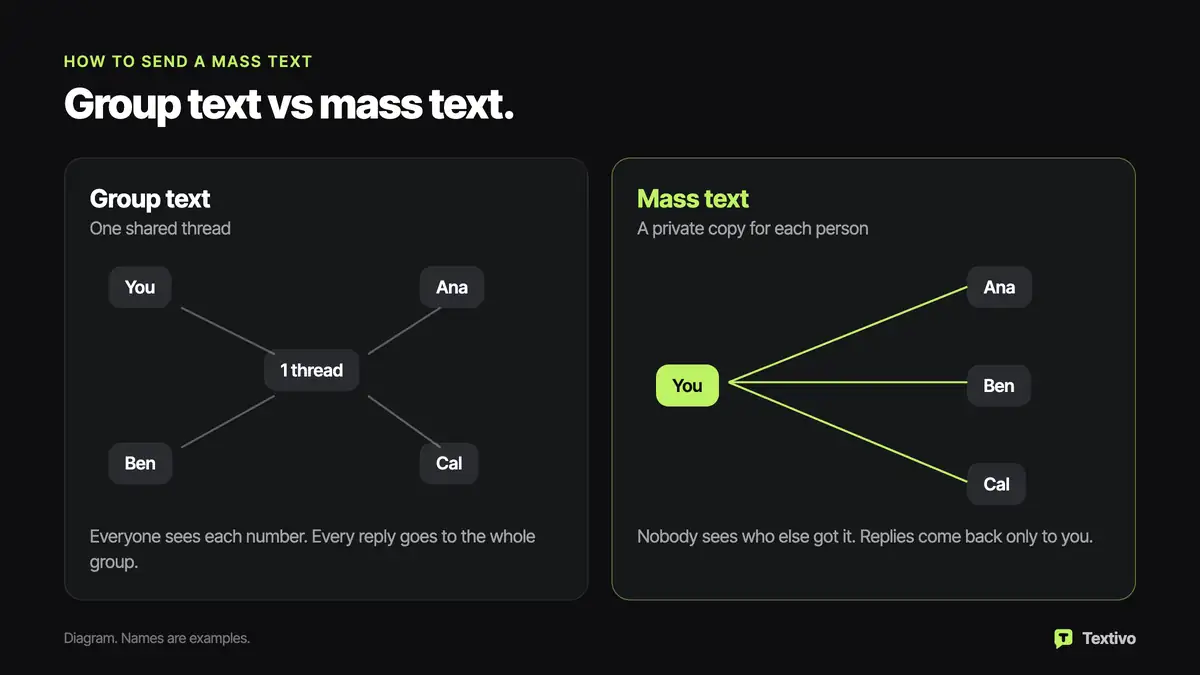
In a group text, everyone shares one thread. They see each other's numbers, and every reply goes to the whole group. A mass text goes out to each person on their own. Nobody sees who else got it, and a reply comes back only to you.
A group text suits a family dinner. For customers, members or staff, a mass text keeps numbers private and spares people replies from strangers.
Mass texting on iPhone without a group chat.
When you add several people to the To field in Messages, iPhone treats it as a group. If everyone uses iMessage, it becomes one iMessage group chat. If some people use Android, it becomes an RCS or MMS group, based on your settings and carrier. Either way, everyone sees the others.
For a few people, the simple fix is to send the same text one at a time. Paste it into a new conversation with each person. It is slow, but private.
For a longer list, the Shortcuts app can do the repeating for you. Menu names can shift between iOS versions, but the idea is this:
- Add a Contacts action and pick everyone you want to reach.
- Add a "Repeat with Each" action so the shortcut works through the list one person at a time.
- Inside the loop, add a "Send Message" action with "Repeat Item" as the recipient and your text as the message.
- In that action, turn off "Show When Run," or you will tap Send for every person.
Test it on two friends first. Check that the Send Message action sits inside the loop, not after it.
Mass texting on Android and Google Messages.
Google Messages has a setting for this. Tap your profile picture, then Messages settings, Advanced and Group messaging. Pick the option to send an SMS reply to all recipients and get individual replies, which Google calls mass text. Wording can vary by phone and app version.
RCS can get in the way. RCS is the newer chat standard. When everyone on your list uses RCS, a send to several people can still turn into a group chat. If that happens, turn off RCS chats in Messages settings before you send, then turn it back on after.
Sending a mass text from a computer.
On a Mac, Messages uses the same Apple Account as your iPhone, so it follows the same group rules. The Shortcuts loop above also works on a Mac. On a Windows PC or a Chromebook, Google Messages for web mirrors your Android phone and sends through it. Either way, a computer gives you a bigger keyboard, not a way around the limits.
Why phones stop working past a few dozen people.
A personal phone plan is meant for one person texting another. When one personal number sends the same text to dozens or hundreds of people in a short time, carrier filters can flag it as spam. Texts may be blocked without notice, and the number can be suspended. A phone also lacks three things:
- Opt-out handling. If someone replies STOP, nothing removes them.
- Registration. A personal phone number is not set up for 10DLC registration.
- Records. A phone does not keep a note of when and how each person agreed to hear from you.
For a choir or a youth soccer team, a phone can still be enough.
How to send a mass text for a business.
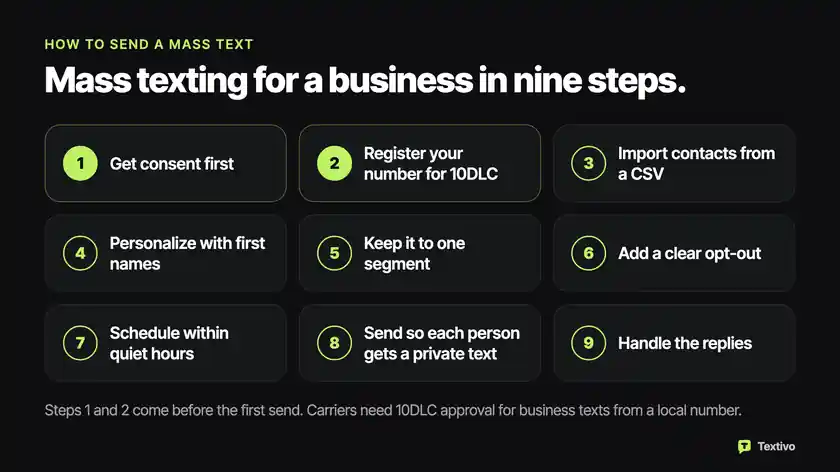
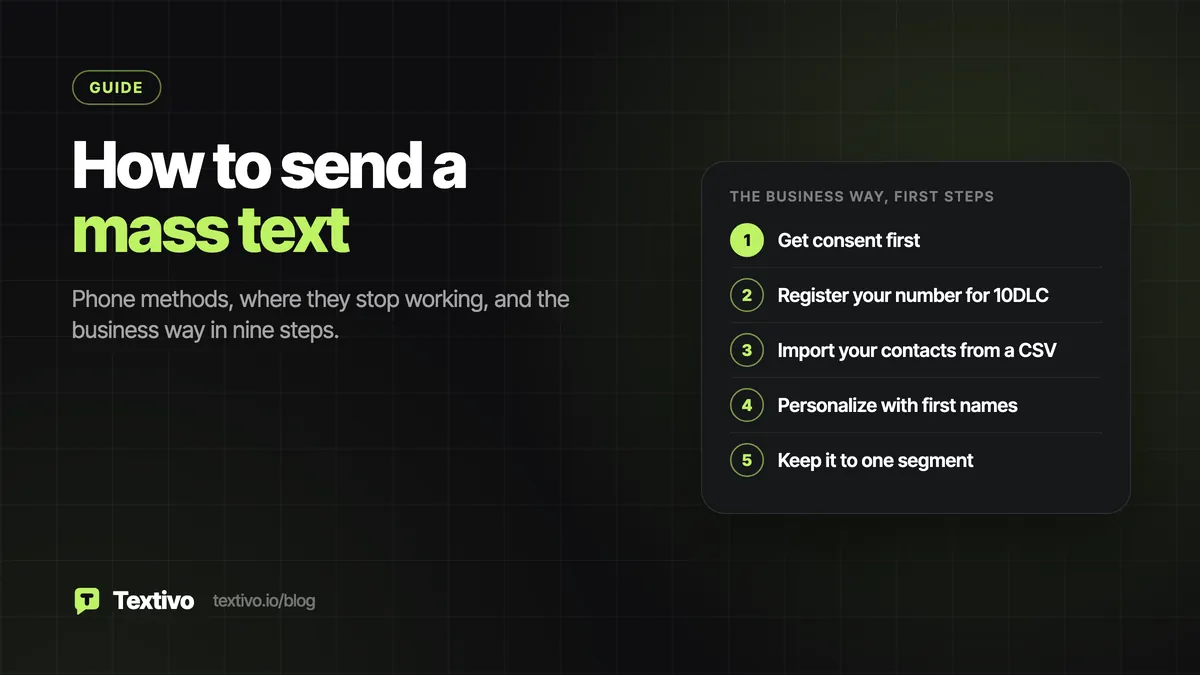
A texting platform sends from a registered business number and handles what a phone cannot. Follow these steps in order.
1. Get consent first.
Marketing texts sent from a business number with an automated system need prior express written consent under the TCPA text message rules. Separately, carriers require 10DLC registration for business texts from a regular 10-digit number. Some states also limit the hours you may text, so check texting quiet hours by state. This is general information, not legal advice.
2. Register your number for 10DLC.
Registration goes through The Campaign Registry. You give your business's legal name, EIN and website and describe the texts you will send. Textivo handles 10DLC registration in the app. Wait for approval before your first send, because unregistered traffic gets filtered.
3. Import your contacts from a CSV.
Export your list as a CSV file with a column for first name and one for phone number. Save it as a group when you upload so you can text it again. Textivo runs a live carrier lookup on every number before a send, so landlines and dead numbers are left out. Each contact keeps a record of its consent source.
4. Personalize with first names.
Write the message once and add a first-name field. Each person then sees their own name. Say who you are in the first few words. Here are two example messages for made-up businesses:
- Hi [Name], Larchmere Yoga here. Our new Elm Street studio opens March 3, with free classes all week. Details: [link] Reply STOP to opt out.
- Hi [Name], this is Brookvale Dental. We are closed Friday for the holiday and open again Monday at 8 a.m. Reply STOP to opt out.
5. Keep it to one segment.
One SMS segment holds up to 160 characters, names included, when you use plain letters, numbers and common symbols. A longer text splits into parts of 153 characters each, and every part is billed. One emoji or curly quote switches the text to a different encoding, where one segment holds only 70 characters, and 67 per part after that. Paste your draft into the SMS segment calculator before you send.
6. Add a clear opt-out.
Your first message, and regular ones after it, should say how to opt out, such as "Reply STOP to opt out." Textivo handles STOP automatically, so anyone who sends it is left out of future sends. Treat any clear request to stop, like "no more texts," as an opt-out too.
7. Schedule within quiet hours.
Send now or pick a day and an hour. By default, sends are held outside 8 a.m. to 9 p.m. in each person's time zone, so a list that spans the country will not wake anyone up.
8. Send so each person gets a private text.
Each contact gets the message as a normal one-to-one text from your business number, as SMS or as MMS with a picture. A one-way send like this, such as a closure notice or a sale, is called a text blast.
9. Handle the replies.
Replies from every contact land in one inbox, where an AI SMS agent can answer and anyone on your team can take over a thread. If you text large lists every week and want a power dialer and a CRM board next to the inbox, look at the bulk SMS platform.
FAQ.
How can I send a mass text for free?
On a phone, texts to a few people are usually covered by your plan, so the iPhone and Android methods above cost nothing extra. For a business, there is no free way to text a large list. Carriers add a fee to every business text, and 10DLC registration has its own fees. If a platform offers a trial, check what it includes before you plan a real send around it.
How can I send hundreds of texts at once?
Use a texting platform, not a phone, so the list goes out from registered numbers at a pace carriers accept. How many texts you can send each day depends on your 10DLC trust score, which is set when you register. Accurate business details help.
How do I send a mass text on iPhone?
Use the one-at-a-time method or the Shortcuts loop described above. You may also see a Group Messaging switch in Messages settings. Turning it off affects plain SMS and MMS texts only. People on iMessage, and people on RCS from iOS 18 on, can still end up in one shared chat, so the switch alone is not a reliable fix.
Can I send a picture in a mass text?
Yes. A picture message is sent as MMS instead of SMS. Use one when it does real work, like a flyer or a map. Pictures can load slowly on a weak signal, so put the key point in the words as well. A first message still needs to say how to opt out, picture or not.
Conclusion.
A group text puts everyone in one chat, while a mass text reaches each person privately. On iPhone, send one by one or build a Shortcuts loop. On Android, change the group messaging setting and watch for RCS. Past a few dozen people, a personal number runs into carrier filters and has no opt-out handling or registration. For a business list, get consent, register for 10DLC, import a CSV, keep each text to one segment and send within quiet hours. Your next step is to export your opted-in contacts to a CSV with first names and phone numbers.
See it on your own list.
A 30-minute demo: we upload a sample list, the AI texts it, and you watch the replies and the bookings come in.